
One list, everyone contributes
Add items from anywhere. Your group sees the same list. Check items off as you shop — everyone sees what's done. The list is the front half of the loop: when someone pays, scanning the receipt checks those items off and turns the purchase into a shared expense, which is how roommates split a grocery run.
- Add items with name and quantity
- Check off items in-store
- Whole group shares the same list
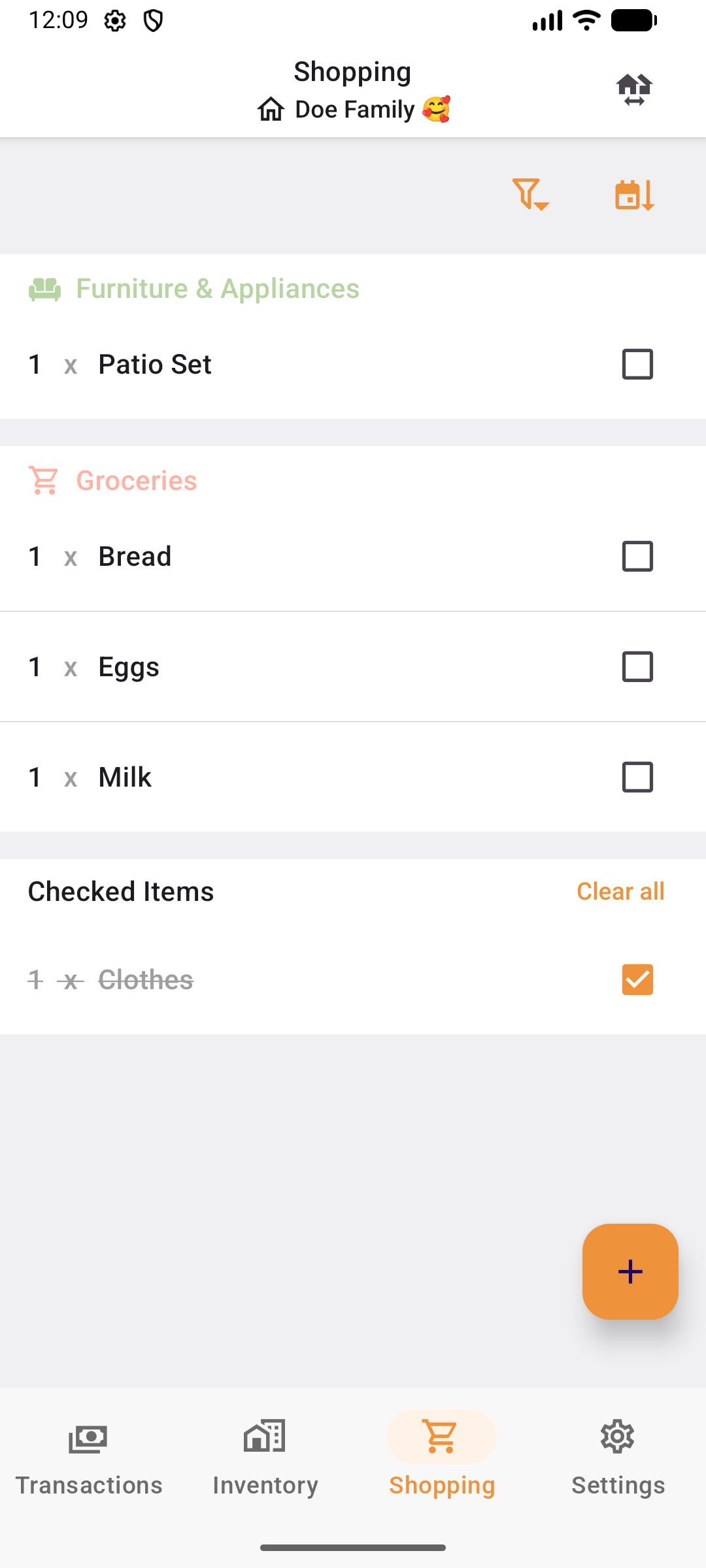
Categories, quantities, and due dates
Items are organized by category — groceries, furniture, household supplies. Set quantities and optional due dates to stay on top of what you need.
- Automatic category grouping
- Quantities per item
- Optional due dates for time-sensitive items
Assign items to group members
Assign specific items to specific people. Everyone knows what they're responsible for picking up, and whoever pays is not left carrying it: the purchase becomes an expense split across the group.
- Assign any item to a group member
- Filter by assigned person
- Configurable entry flow — skip steps you don't need
Find what you need quickly
Sort by creation date, due date, or alphabetically. Filter by category to focus on what matters.
- Sort by date, due date, or A–Z
- Filter by category
- Checked items move to a separate section
Ready to split smarter?
Download ShareBills free on iOS and Android, and start sharing expenses in minutes.